36 comments found.
very clean titles!
Hello! Great job. You have a wonderful and professional portfolio! I wish you big sales! By the way, I’m looking for cooperation with the authors of VideoHive. If you want, you can use my music (with a watermark) in your videos. Just choose what you like. In turn, I will place a link to your work on my page (my page already has an example). If you have any questions or suggestions, just let me know  . Good mood and good luck!

Hi would you please help me? How can I use the same titles for 10 times in the same composition?
Is there an easy way to scale it up to 4K while keeping all the sharpness? (native upscaling)
Hi! Yes, i can fix this for all titles, that not use 3D animations (most of them) and update project. I’am send new file to your email.
Awesome, thanks for the fast reply!
I send you fixed project, check it out.
Hello, do you know why the previews for this in AE would be cut off on each side? I.E. not displaying all the text and animation but only the center portion?
Hello! I’am check my project and it’s work ok for me. Can you send some screenshots? You just opened project or customize it? I want to help you. You can contact me through the “Email” box (at the bottom-right of this page http://videohive.net/user/smartae). Thanks!
Hi, How i cadd more time to a single effect? i want that some can be longer
Hello, check last step: https://i.imgur.com/3Vs3ccJ.png 4 keyframes allow to control animation speed. 1-2 keyframes for in animation, 3-4 for out animation. Also i demonstrate it in video tutorial. Ask me more, if you don’t get good result. Thanks!
How i can change the colors of the elements on the example n° 45? Thanks
Hi, strange think, in title 45 i see two Effect Controls panels. First is empty, all controls in second. Also i try to fix this and send project to your email.
Check email, i hope that it is not blocked by spam-filter.
Thanks a lot !
Same problem with the title 1, to change the color of the elements
i see, and i do, but don’t change the color!
I check it and color changes.  Maybe you turn off live update? https://i1.creativecow.net/u/76294/liveupdate.jpg 377 sales and other buyers don’t have problems. I really want to help you. Maybe you add screenshot? Upload it on http://imgur.com/
Done, i found a solution, was my mistake ! Thanks a lot for your fast answer! You are doing a very great job with this titles! Thanks a lot again for your support !
You can rate my item in your “downloads” if you want. Thanks for using my project!
If I want to use the same title twice in the same video (but with different text) how do I duplicate it?
Hello, you can download free plugin “True Comp Duplicator”, so you click on Title composition, click on duplicate and you can get an infinite number of title copies. This simple and free plug-in useful in many projects. If you have quastions, you can contact me through the “Email” box at the bottom-right of my profile page.
Or you just render your titles, change text, render again and use mov files as titles.
Hi. I purchased this yesterday. I’m using title 1 and am trying to center the text with the line. Is there a way to control the text in relation to the line? Thx.
Hi! It’s hard to make control for this type of titles – users can easy broke the animation, but i can try if you send me screenshoot with your text. Or i can customize project for you text (Only Title 1). Or You can try to customize project: Go Title 1 > Double Click Title 1 PreComp > Click on “Line 1” and press “P”. Now you can see all position keyframes, go to last keyframe and edit position value. I hope this may help You. Thanks!
Good work !
Thanks!
Cool work! Good luck for sales
Thanks
Nice Titles!
Thanks!
I saw some of your title animations being used at the Darts World Championship
Wow, thanks for information, i find channel with DWC videos on youtube, but can’t find my titles.
I saw it live on TV, dont know if any of those are uploaded or not. (It was shown sometimes as a transition video between ads
I purchased the files and they’re easy to work with! Can you send me the background that you used in the preview?
Thanks for purchase, rate my item in “Downloads” tab, if you want.
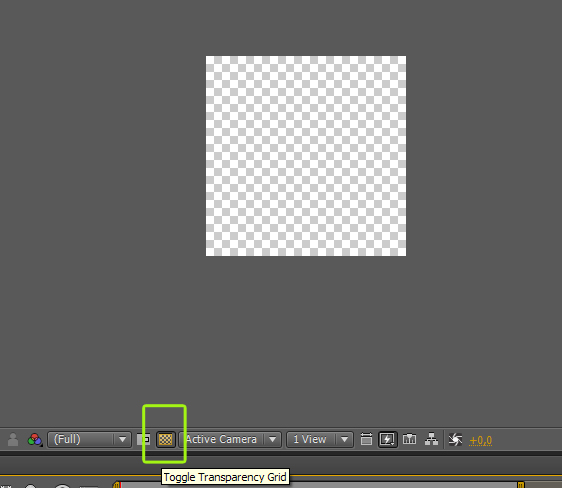
Can I export the titles without the black background? (leave the background transparent)?
Hi Pjmckellar, all titles without black background! You must click on “toggle transparency grid”. https://cdn.tutsplus.com/ae/uploads/legacy/706_circles/2.jpg This is it! Please leave comment if i help you (or not)
+ i’am update project for you soon (default with toggle transparency grid off)
Perfect! Thank you!

Nice work!
Thanks, man!