23 comments found.

how do I expand the total number of the left and right messages, it seems as though I have 5 for each, and I need much more than that… URGENT
Hi, thank you for reaching out to me. Each text message conversation is set to up to 5 text messages on each side. This being said, we have added a feature named “conversation end time”, which will create an animation for you at the end, so that you can add more messages. We explain how this all works in the help video included with the toolkit. You can watch the help video at around time 14:05 we explain how you can duplicate your conversation to add more text messages.
I purchased this product a lil while back and this mogrt text message package files crash premiere pro every single time.
I built this pc for content creation specifically, graphics card etc… all other mogrts i got in the past work – except this one.
I’m also running this on licensed adobe creative suite (not pirated version).
I’m curious if anyone else has the same problem and if it’s the same too. Does the creator of this file have a solution?
Thx
Hi, thank you for reaching out to me!
Are you using the latest version of the template? We have recently redesigned this toolkit completely to make it faster and easier to use. The new version should be almost realtime when making changes and much faster in previews and exports.
You can re-download this from the download section to make sure that you are using this version.
Thanks!
Hi there, is it possible to change the speed of the messages appearing as well as the typing? Thanks
One requires little patience with the loading. Sometimes it is a difficult to tweak the layer. Each click or reposition of the layer takes 20 Seconds to load.
Hi, thank you for reaching out to me!
There is not a direct feature to change the actually speed of the typing. This being said what you can do is select the whole Text Messages Layer in premiere pro and Right click on it then click on: Speed/ Duration. Then you can set the speed to 200% for instance. In this case the speed of the animation would be double so it will be faster. Then you just need to re-adjust the timing of the messages individually from the Text Messages (Essential Graphics).
Hope this is of help!
- Stephan
Thank you, Stephan, for your response. This is a workaround but the pop up animations also change speed. In my case I try to slow it down. Do you think this feature will be available in future versions? Thanks
Thank you for the suggestion. I will keep this in mind for the next update and see if this can be implemented to make the product more customisable. Thanks!
This thing crashes my Premiere Pro 2022 and will not render. I will be requesting a refund immediately.
Thank you for reaching out to me.
When loading large .mogrt files in Premiere Pro it is normal for it to freeze for a moment as it processes the motion graphics data, it is important that when you place the mogrt file on the sequence, you leave the Premiere Pro to process it, without touching anything, since if interrupted at this specific moment it can crash. This is unfortunately something that Premiere Pro suffers from when it comes to large motion graphics templates.
This being said, recently we have created a light version which should eliminate this issue and give much better results. Can you try the new Light Versions available in the downloaded files?
As for refunds, refund requests can be made through the official Envato team portal, since they take care of purchases and money related issues.
You can find the refund terms and link for this here: https://help.market.envato.com/hc/en-us/articles/202821460-Can-I-Get-A-Refund-
Impossible to work with it is EXTREMELY slow! I need a refund
Hi, thank you for reaching out to me. Is it possible to give us more information about this so we can help you out solve any issues? You can contact me directly on:
stephanzammit@neuronfx.comI have tried 3 programs to do texts and this one produces the best possible looking text but the render time is pretty steep. If it was a one render you’re good then it wouldn’t be an issue but often you have to watch the flow of texts to determine the time between each text and that takes tweaking that won’t go well with render times of over an hour.
I see in another comment you offered a customer an After Effects version of the template, do you think that I could get a copy of that?
Hi, thank you for reaching out to us! Can you send us an email regarding this? You can contact mu through the message box on our profile page at the Bottom Right Corner.
Completed this step. Waiting for response thanks.
Thank you, you should find our reply to the email. Let us know if you have any further questions.
Many thanks!
Doesnt work – keeps crashig premier pro! Would like a refund
Hi, Thank you for reaching out to us!
Can you contact us via email, so we can help you find a solution quickly. It would be best to send us a couple of screenshots or a quick Screen Video so we can identify any issues. You can contact me directly in: Stephanzammit@neuronfx.com
Crashes my adobe premiere every time like MM37.. This is really frustrating.
Hi, thank you for reaching out to me. Is there a specific error that is being given? Is it possible to send us some screenshots by email, so we can have a closer look at this issue and find you a solution?
You can contact me on: stephanzammit@neuronfx.com
It completely crashes premiere pro 2022 .. Can’t work with it. Will ask for refund.
Hi, thank you for reaching out to me.
I am very sorry to hear this. If you have a specific problem and would like our help, please don’t hesitate to contact me directly via email, so we can find a solution. You can use the following address: stephanzammit@neuronfx.com
I am sure we can find a solution for you  This said, if problem persists, we can even offer an After Effects version for it, if you would like to try that!
As for refunds, refund requests can be made through the official Envato team portal, since they take care of purchases and money related issues.
You can find the refund terms and link for this here: https://help.market.envato.com/hc/en-us/articles/202821460-Can-I-Get-A-Refund-
Loaded this on two machines with Adobe Premiere 2022 and it’s unusably slow I’m afraid. Any changes requires about 5 minutes of background tasks before the program responds again and I’m using a relative quick machine. Probably needs t be updated or removed unfortunately.
HI, thank you for reaching out to me. I am very sorry to hear this. Can you give me some more details on the system that you are using it with so we can do some further tests. Also recently we have updated this with a light version of the messages, which should give better results in cases when it is a bit slow, etc. Can you try this out and let us know if this works for you?
If problem persists, please don’t hesitate to contact me directly via email, so we can find a solution. You can use the following address: stephanzammit@neuronfx.com
Thanks!
Hi. Thank you for this. Looks amazing, but I’m having problems. I have followed the instructions to load onto my PP 2021 on Mac. When I open my project and drag the essential graphic is places it on the timeline, but before I can make any changes or edits, PP seems to crash. This happens every time, even on a new sequence and a completely new project. Any help would be appreciated
Hi,
thank you for reaching out to me.
Premiere Pro Essential Graphics is sometimes a bit fiddly when loading up new projects. When dragging the text message style to the timeline, it is important to allow it a few seconds without touching the computer, until it loads the package. Since it might get interrupted if you click, etc while it is being loaded.
We have also included a light version of the messages, which should give better results in cases when it is a bit slow, etc. Can you try this out and let us know if this works for you?
Thank you, I did try just the light version. I imported and left on the timeline for at least 5 mins with the wheel of death before force quitting premier
Thank you for getting back to me. I am sorry you still have the problem. Is it possible to send us a quick screen grab video by email maybe? Just so I can have a look at it and see if there are any issues that I can pick up that might be causing this? My email address is: stephanzammit@neuronfx.com
Hello, Unfortunately the bubble cuts off the long messages, is there a solution to increase the height of the bubble?
Hi, thank you for reaching out to us! As for the text box bubble, there is a limit to about 5 lines of message, so yes it might cut it if the message is longer than this. In this case the best thing to do is to add an other message from the same sender right after that one and continue the message right in that. Unfortunately this is a limitation of the project and Premiere Pro, since making the text box larger than this would make the project slower to work with in Premiere Pro.
Hello I just bought your project. Im using premier pro 2020. The problem that i have is that i have no spacing between the texts at all. they all appear side by side and I can’t move them. Please let mo know if the template works with premier 2020 or refund my money please. Thanks
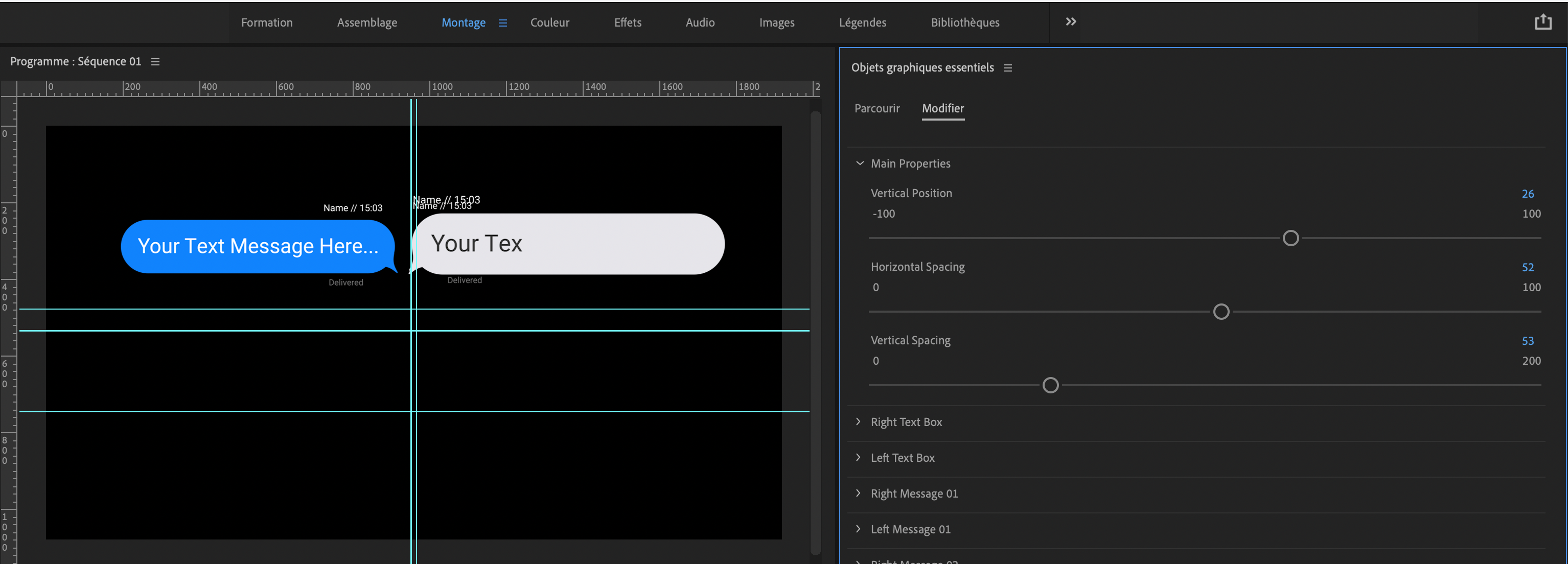
Hi, It looks like the main property is not working. The messages are aligned on a single line next to each other. Nothing changes when I change the settings. Any idea how to unblock the situation? Thanks
V 15.0.0 (Build 41)
Hi, Thank you for sending this.
The problem seems to be the Premiere Pro Language that might be interrupting the expressions of the projects.
Is it possible to switch the language of your premiere pro to international english, and let me know if this fixes the issue.
Here is a quick tutorial that I have found that shows how this can be done: https://www.youtube.com/watch?v=kJqoMYI3YHQ&t=265s
Solved ! Amazing. Thanks for your quick reply.
Hi, it is painfully slow and cumbersome to be of any actual use. The product have a lot of potential to be a great but these major issues need to be fixed soon. Please label your options clearly. It is very confusing and very annoying just to figure out what it does. Secondly, it is painfully slow to render and edit. I really don’t know how you can fix that.
Honestly, I paid for this to assist in my work only to end up wasting a whole of resources and time just to make it work properly.
Hi, thank you for reaching out to me and for your feedback. I am very sorry you are having this experience with the toolkit. Following your feedback I have just updated the toolkit with a light version of the different styles. This should give a considerable performance boost and is now rendering and previewing much faster when using the light versions.
As for features, please do contact me for further information and help should you find trouble in understanding something, etc. I am just an email away and very happy to help! The template of course, comes with a help video tutorial and we have also just updated the item description with this video tutorial so you can access it directly from there.
Can you try the new Light Versions, and get back to me via email, and let me know if this works better for you? If you still find a problem I can even send you an After Effects version of the toolkit, which renders almost real time, since as you might know .mogrt templates always have their limitations. This way you will bypass the .mogrts altogether and get full speed of the toolkit.
It would me the world to us if you change the opinion on our product and if we can be helpful to you.
You can contact me directly on stephanzammit@neuronfx.com
Many thanks!
Would like for the text box to appear before the text starts typing. I’d also love to be able to have the text and box appear at the same time, as it does when receiving a text. Could you let me know where I can find these permitters? Thank!
parameters
Hi, thank you for reaching out to us!
Right now, the text box actually pops up as soon as the text starts to appear, similar to most messaging applications, unfortunately this cannot be adjusted to appear sooner… What you can do, is increase or decrease the animation duration of how the text and box pops in. To do this you can go to the message you want to tweak, for example: Right Message 01, enter into: “Message Properties”, and from here increase the value of “Animation Duration/ Speed”. This way the text will take longer to appear and the text box will sort of appear before the text.
You can also tweak the Start Time of each message, so for instance you can set both Right Message 01 and Left Message 01’s “Start Time” to 1 second, and basically both text messages will appear at the same time at 1 second into the video.
Hope this is of help to you, let me know should you need further assistance
Thank you for your reply. Aside from this toolkit being super duper slow in Premiere. it’s not giving me the flexibility/options I need for my project. Wondering about a refund as I’m not/won’t be using this toolkit.
Hi, thank you for your comment. We have just updated this project with a Light Version of each style. This should give a considerable performance boost and is now rendering and previewing much faster when using the light versions. Since this is in Premiere Pro, the kit is limited to the features that we have included in it, as displayed in the promotional material. This being said, if you would like I can also send you an After Effects version for free, from which you can tweak even more parameters. So we can guide you to make the text box appear before the text starts typing, which is a very quick option inside of After Effects. Should you like to try this, please let me know via my email: stephanzammit@neuronfx.com
I have since gone another route for my animation needs as I had a deadline to meet.
Following up on my refund request two posts ago. I can’t justify this purchase with my company because I didn’t end up using this product for the project.
As for refunds, refund requests can be made through the official Envato team portal, since they take care of purchases and money related issues.
You can find the refund terms and link for this here: https://help.market.envato.com/hc/en-us/articles/202821460-Can-I-Get-A-Refund-
Thank you
Hello—I love the idea of this but my text boxes aren’t resizing to fit my text. It cuts off the last word… Any thoughts on how to fix? Thanks!
Nevermind! Figured it out—thanks!
Hi, thank you for your message and for getting back to us regarding it! Cheers
hi there your toolkit looks nice, but i have a few problems with it:
1. the first message doesn’t appear at all
2. the messages stays all at the same place, they are not switching to top so we can’t see the message history since the layers are all at the same place.
3. the main settings are not working, i can not give any spacing on the two message boxes
can you helo me here?
Hi, thank you for reaching out to us!
I am glad that you like the toolkit and I am sorry for any issues. Is it possible to send us a quick video of the screen to show us the problems directly? This will help us identify any issues and help you out as soon as possible. Also, what is the premiere pro version you are using? So we can double check on this version.
We have also just seen your email so you can send this as a reply to the email. Many thanks!
Looks great but painfully slow in Premiere. Any tips to speed things up would be useful.
Hi Thank you for reaching out to us! I am glad you like how the toolkit looks and I am sorry you are encountering this problem.
For the best performance, it would be best to drop the preview resolution of premiere a bit, say something like 1/2. Since .mogrt templates are never real-time, we also normally suggest to ram preview that specific part, so that you can view it in real-time and see what you are doing. To to this simply select the in point and out point on your Premiere Pro timeline and hit the ‘enter’ key, this will cache that specific part so that then you can preview it in real-time.
An other option is to limit the amount of messages that appear if you are not going to use them all. Basically, by default all the 20 messages are set to appear 1 second after each other, until all the 20 messages appear. What you can do is go to the start time of each text message and give them a high number, like 100, so that they don’t appear when you play the animation. Then only introduce the text messages that you want to use, by giving them a smaller start time, like 1 second, etc.
Hope this is of help to you!
I find it very difficult to adjust the duration of the messages, and end up with too many messages onscreen. What do the numbers in the start time and end time refer to? Frames? Seconds?
Hi, thank you for reaching out to us! The numbers refer to seconds. So basically if you set the start time to 3 and end time to 10, the text message will appear at 3 seconds then it will animate out at 10 seconds. If you have more messages than you need showing up on screen, simply go to their start time and give them a high number, like 100, so that they don’t appear when you play the animation.
So basically, if you need just 3 message on screen, you can simply make the start time of all the messages after the first 3 to 100.
By default the start time of the messages is set 1 second apart so you will have a conversation that is ready to be used, but of course you can re-time this however you like using the techniques mentioned above. Of course let us know should you need further assistance