44 comments found.

HI This says that there is something missing????
Hi, if you give me more information about the problem you’re having, I’ll be happy to help you.
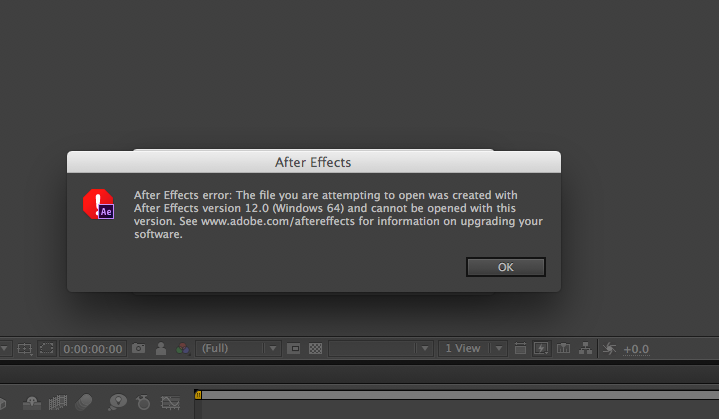
Hi, my AE CS6 says it can’t open your file though you stated it is compatible with CS6. It tells me I need CC to open it. Is there any way you can send me the file in CS6 format instead?
Hi, This template works with CS6. Could you provide me a screenshot when the warning message appears?
This is odd. This template was updated on May 2013 and AE 12 was published on June 2013. Are you sure you are trying to open the correct template?
That is the one I downloaded from you. So, yes. So, is there any way you can save this to an older version then?
Actually, it even works on even CS4. Could you email me from my profile page, please?
Hi. I work on AE CS4 but I cannot find Cycore in my effects tab. Will the project work fine without it, or where should I download Cycore for free?
If you don’t get any errors when you open the project file, you don’t need to worry.
Nice Work 
hi can u edit the text for me ?
Sure. Please send me email from my profile page.
It doesn’t look like the Cycore plugins are bundled with AE CC. Can you point me to which particular plugin is required?
Hi, sorry for late response. CC Pixel Polly, CC Radial Fast Blur, CC RepeTile, CC Vector Blur are required.
good one !
Hi there, great AE template. I need to recreate the “Easy to customize” text about 10 seconds in, in the preview video. Can you help out? I like how the text is revealed better than in the AE file.
Please contact with me via email from my profile page. I’ll send you a project file. So you can easily change the text as you wish.
ellerin sagl?k kardesim yesil temali daha da guzel olmus. basarilarin dewam?n? dilerim.
LOVE this, and it’s perfect for my project but I was wondering if you could point me to where to change the colors on the ashes that blow away? I’ve made my project black and white, and the color there feels “off”—help?
Thank you again for a fabulous project!!
Color of ashes linked to fire color. If you change the fire color, ashes color will automaticly change.
Hmm, I changed the fire color to white, but the crackling ashes that blow away to the right still have red/gold tones…?
Here’s the qucik tutorial. https://dl.dropboxusercontent.com/u/7526694/tutorials/change-ashes%20-color.mp4
You are amazing, thank you SO much for this!!!
Hi,
Is it possible and easy enough to make the flames fly around an earth glode?
Hi,
Flame footage is pre-rendered. It’s not editable.
Hi – looks great!
Before I buy, jut wondering if the background is pre rendered or an alpha, and if the text colour is changeable.
i.e. – We would like to put the animation on a white BG with black text,
Everything in project is changeable. You can change color of text only one click.
Awesome!!!

Looks very nice!
Purchased this about 10 days ago. When I go to open up footage, tells me files corrupted. Still can’t get to work after re downloading.
Also, the player you used on tutorial video has no resemblance to any software I have. What is that? But should work with anything.
Thanks in advance.
You must have After Effects to use this template. If you don’t have After Effects, I give editing template service.
http://www.adobe.com/products/aftereffects.htmlStill need help, sent email. Thanks
found the file on audio jungle
hey i just downloaded this file after purchasing but i dint get any sound. Was this suppose to have no sound?