43 comments found.
Hi I want to buy this but can you tell me what skills I need to have it? Is it mandatory for me to have after effects knowledge?
Hi, Thank you for asking! There is a step by step help video included that is designed for first time users. You don’t have to have any prior knowledge of after effects.
Thanks for your quick reply. Do I need after effect software also?
Yes you will need Adobe After Effects CS4 or higher. Kind Regards

Hi, you did a great job. Can I translate all the sentences in Italian?
I apologize for the delay! Thank you, yes you can type any text you want as long as it reads right to left.
My video is after rendering it not that great it stops sometimes and dont start from the beginning…
Als rendering costs alot of time is their a service which could render it for me?
Hi, thank you for purchasing! Yes I can render the project for you for a fee. Please send me a message from my profile page for more information http://videohive.net/user/motioncraver (bottom right) However, it sounds like you may just need to render from one of the pre-made Render Comps in the Render These Comps folder. And these render settings may be helpful http://vimeo.com/24027726 Best Regards 
Send you a mail 
Hi there, I just bought the promo and I love it.
The thing is that I want to have a voice over, which is aligned with the animations.
How could I shorten some of the scenes, make them shorter, so while the person is talking, the right thing is shown?
Hi Thank you for purchasing! If you can, I would recommend making the video first, and asking the voiceover artist to read along with the video. It would be much easier that way. However, if that isn’t an option you can move the slide layers individually in the Main Comp to change how long each slide is visible. For animation within the slides you can use time remapping to speed them up: http://www.videocopilot.net/basic/tutorials/06.Time/ or select a layer and press U to see the keyframes and adjust them to suit your needs. You can send me a message from my profile page: http://videohive.net/user/motioncraver (bottom right) if you need more detailed instructions.
I love this design but is there any way to change the ethnicity of the character? For example are there option to make the person, black, latino or asian looking?
Hi Thank you for your interest in this template. You can change the color of the characters skin and hair, and it is shown in the Help Video. However, those are the only options.
Excellent work. I wish you even more sales;)
Thank you so much
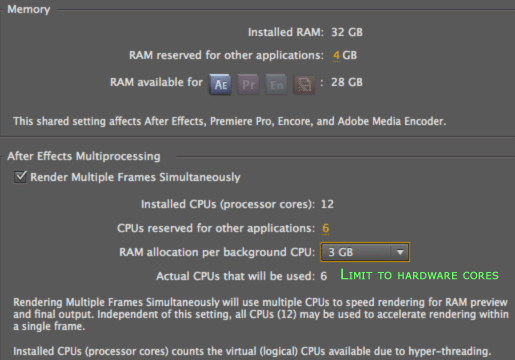
Hello friend just bought the template but I can not render it tells me missing RAM, and it happens on all machines … My machine has 3GB of Ram and other occasions if I could render the videos .. favorable aid
Hi Thank you for purchasing! Please try setting the “RAM reserved for other applications” to 0 and maybe turning off Multiprocessing, if it is turned on as seen here: http://macperformanceguide.com/images/MacProWestmere2010/settings-AfterEffects.gif You can access these settings by choosing Edit>Preferences>Memory & Multiprocessing
hello dear author, was wondering if you have a female version one?
Thank you for your interest in this project. Unfortunately, I do not.
Can be supported with arabic language ??
Thank you for your interest in this project. Yes it does
Nice , i don’t use after effect before .. it a hard work for mak edit with arabic language ??? and all text dir mast me right to left any effects will be corrupted ??
It shouldn’t be any more difficult. All effects and expressions should work for any language. But if you have any trouble just send me a message here http://videohive.net/user/motioncraver (bottom right)
Good … But there were any money back guarantee if i have an error with arabic lang ??
Sorry, there’s no money back guarantee.
Ok , i don’t want my money back .. only i want video work good if there were any error you can help me to complete all customizations ??
If there were an error with the template yes I would help you fix it. No problem. You would still have to complete the customizations yourself or hire a freelancer. Thank you for asking.
If there were an error with arabic lang … who fix it ??
I’d fix it.
good … i will make order now
Wait! Before you purchase please email me here http://videohive.net/user/motioncraver (bottom right) I have some questions about how the arabic language is written. Thanks!
done
Thanks! I replied to your email, letting you know that I found the answers I was looking for, and that I was confusing Arabic with a different language. Also, I provided a link to a plugin that may help. But this project will not work with Arabic.
Please check your mail .. i send you message and wait your replay ..
Hi I don’t have the script/plugin for adding Arabic text to test it out, if the license allows it, you can send it to me and I’ll test it for you. However, once again I don’t think this template will work for you.Thanks!
Hi , it’s free script this amount for donation put 0 on price and you will be able to download it for free
Hi , what new ?
I wait you …
Hi, apologize for the delay. I finally had a chance to read more on the script, and it will not help with the animations in this template. Besides, I’m sure the script creator would appreciate a donation.
Hi , can i see effects thats you make with arabic ???
I did not make any. The text is revealed by masks, and other effects that the script does not cover, so there was no need. This string of comments is getting quite long. It would probably be best if you message me with any further questions. Best Regards
I have a question I’m hoping someone can help me out with.
I love this promo but need to change out the cloud and floater image in the blackboard section with another character image. I was thinking the pointing man image.
I’m having trouble figuring out how to easily do this. I can’t seem to replace footage. I’ve dropped the pointing man file into slide 8, but I can’t seem to move it around in the same fashion as the original file.
Any suggestions?
Your help is most appreciated…
Thank you for purchasing! Please email me here http://videohive.net/user/motioncraver (bottom right) so that I can walk you through the changes. Regards!
hi there,
I am having some problems rendering this for web –
I have tried starting to render as a FLV file, it said it was going to take 48 hours to render  (thats when i choose render 720×480 –
click on output model lossless and choose flv.
dont have quicktime option)
(thats when i choose render 720×480 –
click on output model lossless and choose flv.
dont have quicktime option)
any chance we can email personally ?
I would suggest using the settings found in this short video http://vimeo.com/24027726 . Sure you can email me here http://videohive.net/user/motioncraver (bottom right) I’d be happy to answer your questions. Thanks for purchasing!
LOL Have to stop buying your stuff! Incredible work. Thank you
Thank You! Wait..Please don’t stop! LOL I really appreciate the support.
Hi there, I love this, but is there a possibility of having a woman character?
Hi, Sorry, not at the moment. But I will have an explainer video available with a female character soon. If you want you can email me from my profile page http://videohive.net/user/motioncraver and I’ll send you an email when it is done. Thanks!
Love your video.
I’d like to know if I wanted YOU to drop the text and video in for me, how much would the finished video cost? We would also like the music. Can you include that in your price?
We are not asking for any tweaks to the base file, just simple customization. Thank you very much.
I can e-mail you a a series of screenshots in sequence order for you to know exactly what text and videos we would want in the video.
Hi, Thanks, I’m glad you’re interested in the project. Please send me an email from my profile page so that I can email you the costs as well as more information about the customization process. http://videohive.net/user/motioncraver (bottom right)
All its right. The theme is fantastic.
I put the CAPS LOCK after start to render and i solve the problem.
Thanks for all.
Alfredo
Glad to here it. Using Caps Lock is a good tip, sorry I didn’t think of it at the time. Thanks again for purchasing
Sorry for my english. Im spanish. Im traying to render and in CS4 1280 x 720 are 36 hours…..
I can´t understand this time. How can i render with quality and a normal time.
I Optimal qualyty put in Windows Media and without audio
Please help me. Thanks.
Alfredo
Hi Alfredo, Thank you for purchasing! Depending on your machine, this project can take a while to render because of its length and the amount of animation with motion blur. I would recommend using the settings explained in this video http://vimeo.com/24027726 Please email me from my profile page (http://videohive.net/user/motioncraver (bottom right)) if you run into any problems.
Hi Motioncraver, i like your project and i have a question before purchase it. Can i use only the first character (the man with white shirt with tie) in the entire project?
Thanks.
Hello Thank You for your interest in this project. Unfortunately you would not be able to use that character throughout the whole project, but you can change the color of the other characters’ clothes to white and black.
Hi love this video :0) which i’m thinking of buying…
Just wanted to check if you can replace the character with your own artwork, is this hard to do? or can you help? Thanks x
Hi Sophie, Thank you for your interest in this project. Yes you can replace the character with your own artwork, but you would have to rig and and animate the new character. If you would like me to animate the character for you please send me a message from my profile page (http://videohive.net/user/motioncraver (bottom right)) so that I can find out more about what you need. Thanks
You help video is very easy to follow, even for a noob like me.
Only 1 problem though: I am using a Macbook Air. The video is just above 2 mins but the estimated rendering time is around 30 hours. Is it normal?
I’m really glad that you found the video and file useful. Yes, given the length of the video,the amount of animation, and the strength of your machine that render time would be normal. If you have to, you can reduce the render time by rendering without motion blur. (In the Main Comp click the “moving circle” icon at the top of the timeline.) The animation won’t look as smooth but it will render faster. Hope this helps. Thanks.
Thank you for this great product. I have just purchased it and hope that I can manage to customize it myself!
Thank you for purchasing. Let me know if you have any trouble.